YOUCANIC Replacement Bluetooth VCI Adapter for UCAN-II Scanners (UCAN-II-B, UCAN-II-C, UCAN-II Pro), Specify Your Model at Checkout
Easy Returns
If you don't love it, return it within 31 days. No questions, no stocking fees.
Lost Or Damaged VCI? This Puts Your Scanner Back On The Car.
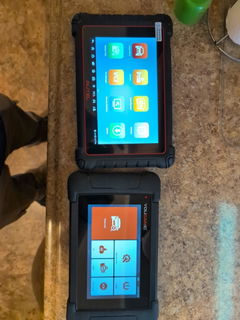
The VCI is the Bluetooth adapter that plugs into the OBD2 port and relays the vehicle to your YOUCANIC tablet. Without it the scanner cannot connect. This is the genuine replacement for the UCAN-II-B, UCAN-II-C and UCAN-II Pro, matched to your scanner model before it ships, with a setup video to pair it in a few minutes.
Tell Us Your Scanner Model. We Cannot Ship Without It.
The replacement VCI is matched to the scanner it will work with. In the order notes at checkout, or by email to support@youcanic.com right after you order, give us two things: your scanner model (UCAN-II-B, UCAN-II-C, or UCAN-II Pro, which is hardware version D) and the serial number from the label on the back of the tablet.
If the note is missing we email you before shipping and the order waits until we hear back. Not sure which model you have? Email a photo of the label and we will tell you.
Before You Buy: Two Minutes Of Checks
If your VCI is lost, left in a customer's car or crushed, skip ahead and order. If it is in your hand and the scanner will not connect, try these first. Most "dead VCI" calls end here.
- Ignition on. The VCI is powered by the vehicle's OBD2 port. With the key off, many cars cut power to the port and the VCI light stays dark.
- Seat it firmly. A VCI that is a few millimeters out of the port powers up but will not talk to the car.
- Re pair it. In the scanner app, open the VCI settings and pair again. The setup video below shows the screens.
- Try another vehicle. If the VCI works on a second car, the problem is the first car's port or fuse, not the VCI.
- Still nothing, and your scanner is under warranty? Call us before you buy. A defective VCI inside the warranty period is replaced at no charge; one owner below describes exactly that.
Pairing The New VCI
A replacement VCI has to be introduced to your tablet once. This video walks through it screen by screen; it takes a few minutes and you do it once.
Stuck at any step? Call 1-888-959-4265 with the scanner in front of you and a technician will finish the pairing with you.
Which Scanners It Fits
| Scanner | Fits | Note |
|---|---|---|
| UCAN-II Pro (hardware version D) | Yes | Write "UCAN-II Pro" and your serial number in the order notes |
| UCAN-II-C | Yes | Write "UCAN-II-C" and your serial number |
| UCAN-II-B | Yes | Write "UCAN-II-B" and your serial number |
| UCAN-II-A and the original UCAN-II | No | Those scanners connect with a cable, not a Bluetooth VCI. Email us for the right part |
| Other brands | No | The VCI only works with YOUCANIC scanners |
Your model is printed on the label on the back of the tablet and shown on the About screen in the scanner app.
From An Owner
"I was having a potential problem with my VCI module and contacted the technical support team. Customer service reached out and immediately sent me a brand new one without hesitation or question. That is what I call customer service."
Specifications
| Part | Genuine YOUCANIC Bluetooth VCI (vehicle communication interface) OBD2 adapter |
| Works with | UCAN-II-B, UCAN-II-C, UCAN-II Pro (hardware version D); matched to your model before shipping |
| Does not work with | The original UCAN-II and the UCAN-II-A (wired scanners), or any other brand |
| Connection | Bluetooth to the tablet; 16 pin OBD2 to the vehicle; powered by the vehicle's port |
| Required at order | Scanner model and serial number, in the order notes or by email |
| In the box | One VCI adapter |
| Weight | About 0.3 lb |
| Warranty and returns | 1 year YOUCANIC warranty, 31 day returns, US based support from Towson, Maryland |
Frequently Asked Questions
Which model do I have?
Look at the label on the back of the tablet, or open the About screen in the scanner app. The UCAN-II Pro is hardware version D. If the label is worn, email a photo of the tablet to support@youcanic.com.
Why do you need my model and serial number?
The replacement is matched to the scanner it will pair with. With the model and serial number we send the right VCI and the pairing goes smoothly; without them we have to stop and ask, which delays your order.
Do I have to do anything to make it work?
Pair it once with your tablet, following the video above. After that it connects automatically whenever it is plugged into a car.
Will it work with an Autel, Launch or other scanner?
No. It is a YOUCANIC part for YOUCANIC scanners.
Can I buy a second one as a spare?
Yes. Shops that move between bays sometimes keep one in each. Give the same scanner model and serial number at checkout.
My VCI is faulty and my scanner is less than a year old. Should I buy this?
Not yet. Call or email support with your scanner serial number and the symptoms. A defective VCI within the scanner's warranty is replaced at no charge.
Is this the same VCI that came with my scanner?
Yes, the same part your scanner shipped with, for your model.
Have another question? Search the full YOUCANIC knowledge base:
Our Commitment To You
Shipping information
Use this text to share information about your product.
Returns & warranty
Use this text to share information about your product.