USA Fast Shipping - Love it or Return It
QUICK ANSWER FOR SUBARU OWNERS
Written by the YOUCANIC technicians in Towson, Maryland, from the UCAN-II Pro coverage database and our own shop work. Updated October 24, 2026.
A current Subaru carries close to forty control units, from the engine and CVT to EyeSight, the keyless access pair, the body integrated unit and the rear vehicle detection radars, and the parts store code reader talks to one of them. The tools below are what we use in our own shop in Maryland to reach every module on a Subaru, run the service functions the dealer charges an hour of labor for, and get the car back on the road. The coverage database behind the UCAN-II Pro lists the North American Impreza and Crosstrek, Forester, Legacy and Outback, WRX, BRZ, Ascent and Tribeca by model year from 2015 to 2023, with a 1998 to 2014 group behind them. No adapter is needed on any of them.

Reads and clears engine codes from your phone and gives you a live gauge dashboard. It does not see the ABS, airbag, EyeSight or body modules, and it cannot run a brake maintenance mode. Right if the only light you care about is the engine one.

Full system, bidirectional, lifetime free updates. Reads and clears every control unit, runs active tests and the Subaru service functions: brake maintenance mode and EPB release, ABS sequence control, VDC centering, CVT learning value clear, injector code registration, oil change reset, coolant air purge, integrated unit customizing. The tool to own if you keep a Subaru running.

Same scanner, shipped both ways free, with a refundable deposit that comes back when it does. For the one rear brake job, CVT reset or airbag code you need done once.
Every Subaru in the coverage database plugs straight into the 16 pin port under the dash. There is no round under hood socket as on the older German cars, no Ethernet adapter and no security gateway subscription. The check worth doing is your exact model and model year at coverage.youcanic.com, because the module list grows with the year: the 1998 to 2014 group shows engine, transmission, brake control, airbag, the integrated unit, cruise control, occupant detection, keyless access, power steering, TPMS, parking brake, air conditioning and EyeSight from 2009, while a 2023 WRX shows 39 modules including the DCCD center differential, the steering angle sensor, the EyeSight assist monitor, the power rear gate, the rear vehicle detection radars and telematics.
On the tablet you pick the control unit, then the function category (Special Function, Active Test, Integrated Unit Customizing and a few Subaru specific modes), then the routine. These are the routines the coverage database lists for Subaru in the North America region, grouped by the job you are doing. Names are as they appear on the tablet. Coverage varies by model and model year, so check yours before you order.
| Job | Routines in the coverage database | Where it lives on the tablet |
|---|---|---|
| Brakes, ABS, VDC and parking brake | ABS sequence control mode, VDC check mode, VSC (VDC) centering mode, Zero setting mode of pressure sensor, Brake maintenance mode, Electric Parking Brake (EPB) compulsion release mode, Brake lamp lighting operation, Check mode change, Cruise control 1 to 6 brake pressure forced pressor modes, Reading of parameter: ECM to tool | ABS (Brake control), Brake control system, Parking brake system › Special Function |
| Engine, fuel and emissions | Injector code new registration (Tool to ECM), Read injector code (ECM to Tool), Register the reading code (Tool to ECM), Injector code display, EGR valve opening angle learning, Exhaust Gas Recirculation (EGR) dirt learning value reset, Turbo vanes angle learning, Air flow sensor learning, VVT initial position learning value display, Clear learning value, Forced S purge, Engine oil change, Engine coolant air purge mode, Simple roughness monitor, High-grade roughness monitor (without harness), Test mode change, Entry vin, Start count reading, clearing and writing, Dealer check mode procedure | ECM (Engine) › Special Function and Active Test; the database also lists ECU Specification Information and Dealer Check Mode Procedure as categories on the engine side |
| Transmission and drivetrain | Clear AT learning value, AT learning mode, Rear differential inspection mode, AWD on/off switching mode, plus the A/T related learning and inspecting mode and Compulsory learning mode categories the database lists on the transmission side | TCM (Transmission), AWD (AWD control), DCCD › Special Function and Active Test |
| Steering, suspension and driver assistance | Clear EPS internal value 1, Clear vehicle specific assist map, VSC (VDC) centering mode and Zero setting mode of pressure sensor after steering or suspension work; the EyeSight (ES), EyeSight Assist Monitor (EAM), Steering Angle Sensor (SAS), Reverse automatic braking (RAB) and left and right rear vehicle detection modules carry special functions and active tests the database lists by model | EPS (Power steering), ABS (Brake control), ES (Eyesight), SAS › Special Function and Active Test |
| Body, comfort, lighting and climate | Expansion valve fully open mode, Refrigerant filling mode, Expansion valve initialize mode (AC), Off delay time, Automatic lock time, Automatic locking setup, Lockout prevention, Rear defogger operation mode, Wiper deicer mode, Security alarm setup, Impact sensor setup, Alarm delay setup, Passive alarm, Siren setting, Answer-back buzzer setup, Hazard answer-back setup, Door open warning, Outside temperature offset, Rear fog light setting, Dome lamp alarm setting, Map lamp setting, Belt warning switch, Keyless power window switch, Factory initial setting (Integrated unit), Airbag ECU, sensor id, Read memory by id, Rezeroing, VIN entry (SRS) | AC (Air conditioner) › Special Function; Integrated unit mode › Integrated Unit Customizing; SRS (Airbag) › Special Function; BCM, LT headlamp, PWD and PWP power windows, MIRD and MIRP mirrors, SEAT memory › Active Test |
| TPMS and tires | Id registration, which pairs the U360 replacement sensor after you program it from the tablet, plus the Transmitter ID data monitor category for reading the four sensor IDs | TPMS (Tire Pressure Monitoring System) › Special Function and Transmitter ID Data Monitor |
Two entries pulled from the North America region of the coverage database, with the control units the UCAN-II Pro lists on each. Every unit gets fault codes, live data and, where the database shows it, active tests and special functions.
| Vehicle in the database | Control units | Examples of what it lists |
|---|---|---|
| 2023 Subaru WRX (23MY, North America) | 39 | ECM (Engine), TCM (Transmission), ABS (Brake control), SRS (Airbag), IPC (Combination meter), TPMS, DCCD (driver control center differential), BCM (Body control), AC (Air conditioner), EPS (Power steering), SAS (Steering Angle Sensor), SMTP and SMTC (keyless access with push button start), ES (Eyesight), MFD (Multi-function display), PRG (Power rear gate), LT (headlamp/fog lamp), IMMO (Immobilizer), RH and LH (rear vehicle detection), CCU (cockpit control), SEAT (power seat memory), EAM (Eyesight Assist Monitor), TLM (telematics) and more |
| Subaru, Other models, all years (the database's 1998 to 2014 group) | 31 | Engine control system, Transmission control system, Brake control system, Airbag system, Integrated unit mode, Cruise control system, Occupant Detection System (ODS), Keyless access system, Power steering system, CAN system, Tire pressure monitor, Parking brake system, Air condition system, Eyesight (from 2009 model year), Adaptive Cruise Control (ACC), Automatic Light and Wiper (ALW) system, Combination meter, Multi-function display, Automatic Start/Stop, Drive motor control system, Hybrid Powertrain Control (HPC) system, Battery energy control system, Power rear gate, Automatic headlamp leveling system and more |
The database lists the 2015 to 2023 model years by model (Impreza and Crosstrek, Forester, BRZ, Legacy and Outback, WRX, Tribeca, Ascent) and groups 1998 to 2014 under one entry, so the older cars get the generic system list above rather than a model by model one.
Key and keyless ID registration, immobilizer work, EyeSight camera aiming with the factory target set, and anything that needs the Subaru Select Monitor with a dealer account are not what this tool is for, and no aftermarket scanner replaces the dealer for those. The same goes for flashing a new calibration into a module. For diagnosis, live data, active tests and the service functions above, which is what most owners and independent shops actually do week to week, the UCAN-II Pro covers it at one price with no renewal fee. Functions vary by model and model year, so check your car or email support@youcanic.com with your VIN and the function you need.
No. Every Subaru in the database connects through the standard 16 pin port with the cable in the box. Plug in, select the model and model year or let the tool read the VIN, and scan.
Yes. Brake maintenance mode and the electric parking brake compulsion release are in the brake control special functions, and the EPB guide walks through the sequence, including releasing the brake again when the pads are in.
Yes. Clear AT learning value and AT learning mode are in the transmission special functions. The transmission adaptation guide covers the drive cycle that follows.
No. Keyless ID registration and EyeSight camera aiming need the dealer system and its targets. The UCAN-II Pro reads and clears EyeSight and keyless codes, runs their active tests and does the service functions listed above.
Yes. The rental is a one week rental plus a refundable deposit, shipped free both ways. Most Subaru renters want a rear brake job, a CVT reset or an airbag light cleared.
Use the coverage checker by model, model year and module, or call 1-888-959-4265, Monday to Friday 9 AM to 4 PM Eastern, and a technician will tell you plainly. If it does not do what you need, we will say so. Every scanner also comes with 31 day returns, no questions asked.
Working on a different make? See the scanners by make hub, the service functions explained one job at a time, and the step by step repair guides on youcanic.com.
4.82 / 5.0
273 Reseñas
Cuando su automóvil se avería, la frustración y la ansiedad de enfrentar una tarifa de diagnóstico de $200 en el concesionario pueden ser abruma...
Ver todos los detalles4.83 / 5.0
12 Reseñas
The Same UCAN-II Pro. Same Warranty. Same Lifetime Updates. $100 Less. An open box UCAN-II Pro is a scanner that came back to us, was tested o...
Ver todos los detalles4.92 / 5.0
13 Reseñas
Desglose de los costos Costo de alquiler de $ 85 El depósito de seguridad de $400 es totalmente reembolsable . Agregue esto al carrito. ...
Ver todos los detallesThe Gauge Cluster Your Car Should Have Come With, On Your Phone The YOUCANIC UCAN-GO is a Bluetooth 5.1 OBD2 adapter that streams live speed, ...
Ver todos los detalles5.0 / 5.0
2 Reseñas
El escáner YOUCANIC OBD-II le permite leer y borrar las luces de verificación del motor. Puede leer códigos de falla y borrarlos en cualquier ve...
Ver todos los detalles4.81 / 5.0
26 Reseñas
Descubra el poder de las inspecciones flexibles y en profundidad con el videoscopio USB YOUCANIC. Equipada con una sonda con cámara en la punta, e...
Ver todos los detalles4.83 / 5.0
6 Reseñas
Imagínese que está a punto de salir para una reunión importante o un viaje por carretera muy esperado, pero su automóvil no arranca. La frustración...
Ver todos los detallesOne TPMS Sensor For Both Frequencies. Programmed By The Scanner You Already Own. The YOUCANIC U360 is a blank, universal tire pressure sensor ...
Ver todos los detallesNeed One TPMS Sensor And No Tool To Program It? Send Us The ID. We Ship It Ready. A dead tire pressure sensor normally means a trip to a shop ...
Ver todos los detallesYOUCANIC Scanner – Battery Performance and Overall Review
When I first powered on the scanner, I was concerned about the condition of the battery. The unit arrived showing approximately 80% charge, while the system indicated that the last full charge had occurred about 169 days earlier.
During the initial use, the displayed battery level dropped unusually quickly. For example, during one test it decreased from approximately 72% to 52% in only 28 minutes of operation. Initially, this made it appear that the battery might be defective or had significantly degraded capacity.
Instead of immediately concluding that the battery was bad, I decided to perform several discharge and recharge cycles. During the first cycle, I used the scanner until the battery reached approximately 35% and then fully charged it. During the second cycle, I discharged the battery to approximately 10% and then charged it completely to 100%. That full charging cycle took approximately 4 hours and 14 minutes.
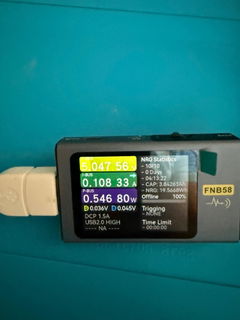
I also monitored the charging process using external USB power meters, measuring the charging voltage and current and observing how the charging current gradually decreased as the battery approached 100%. Based on these measurements, the charging process itself appeared normal.
After these cycles, the battery indication became significantly more stable. During my latest test, I continuously used the scanner for 1 hour and 33 minutes, performing vehicle scans, reading live data, checking OBD-II monitors, and exploring different diagnostic functions. At the end of that session, 71% battery remained. In other words, the scanner consumed 29% of its displayed battery capacity in 93 minutes. If approximately the same discharge rate continues, this corresponds to roughly 5–5.5 hours of continuous operation, which appears reasonable for this device.
Based on my experience, if a newly purchased scanner has been stored for a long period and initially appears to discharge unusually quickly, I would not immediately assume that the battery is defective. In my case, the behavior appears to have been related to an inaccurate State-of-Charge estimate after extended storage rather than clear evidence of actual battery failure. After two discharge/recharge cycles, the battery indication stabilized considerably.
I think this information may also be useful to YOUCANIC and its customers. If a customer reports unusually poor battery performance immediately after receiving a unit that has been stored for an extended period, it may be worth recommending one or two reasonably deep usage cycles followed by a complete recharge before determining that the battery itself is defective. This may allow the battery-management system to establish a more accurate State-of-Charge estimate.
As for the scanner itself, I am currently using it primarily for my own automotive diagnostic work, training, and working on my own vehicle rather than for commercial customer work at this stage.
After spending time with the device and exploring its capabilities, I can say that I am very satisfied with what it offers for the price. At this point, I consider it a very reasonable purchase in terms of the balance between cost and diagnostic capability. It provides full-system diagnostics, Live Data, OBD-II functions, on-board monitors, special functions, active tests, and many other capabilities that I am still learning and exploring.
Based on my experience so far, I believe this scanner is not only a very good tool for personal use and learning, but also appears capable enough for professional automotive diagnostic work. Of course, I will be able to evaluate its long-term professional performance more fully after using it on a wider variety of vehicles, but my experience so far has been very positive.
My next YOUCANIC equipment purchase will most likely be the four-channel automotive oscilloscope. I am going to wait a little longer before purchasing it because I currently use my own two-channel oscilloscope, and for my present diagnostic needs two channels are sufficient. As my automotive diagnostic skills and work develop, however, a four-channel automotive oscilloscope seems like a logical next step.
I have also installed a screen protector on the scanner for additional protection. Since diagnostic equipment is regularly handled in an automotive environment and I may eventually use this unit professionally, I think protecting the display is well worth doing.
Overall, after resolving my initial concerns about the battery indication, my experience with the YOUCANIC scanner has been very positive. I am continuing to learn and explore its capabilities, and at this price point I believe it is a very capable diagnostic tool and a very reasonable investment.
I've used several testers over the last 30 years. They have gotten smaller and better! This one is amazing and the price is great! I would definitely recommend it, if you're ir considering a battery tester.
Professional here, I have launch, xtool, and many others. I have used Ford, Honda, Hyundai, Subaru, and other dealer tools. This one is by far my favorite. It's easy to use and affordable. Lifetime support and free updates, with user friendly software is amazing.
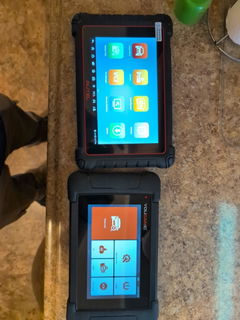
So i compared this to my trusted autel mk900bt, and heres an honest review, i paid for the unit myself, and despite having talks with support, and even the company founder himself, i wasnt able to score any freebies haha.
Pros that the youcanic beat the autel-
1. For live data, all the live data values have a recommended parameter value, example: if your one sensor is reading 10mv, and you have no clue what that means, the youcanic will tell you it should be .9-.11 indicating it's all good(i dont know if every bit is 100%, but i assume its all a great guideline)
2. Topology, i spoke to the support team who told me the topology works by actually communicating with the vehicle and plotting out the map of the systems, unlike something like Xtools that just takes a wild guess, although i do think topology is overated, and always has the risk of sending you down a wrong path, it's still good and cool to have over not having it.
3. Free updates, doesn't look like youcanic os going under soon, so that's a huge plus, they seem to care about their product.
4. Autovin scan is not subscription or Internet based, meaning you should be able to connect and automatically scan a vehicle without internet connection, without choosing make, model, submidel/ typing in vin, nice plus if you're mobile and dont have a good hotspot.
5. Scan time of vehicle (detecting vehicle and running diagnostics) takes roughly the same time as autel, 2 minutes. Some cars it was a few seconds faster, some slower.
6. Ive looked into all the scan tools, and this is the best bang for the buck, I'd avoid xtools/ gear wrench, not a fan of topdon, thinkacar, as they are a bit pricey and you should just chose autel, ancel/ foxwell are underwhelming, and autel (mk/ mx 900) is the only other scantool I'd chose for the $500ish range, it is about $50 more than this.
7. Although the autel has some fancy shop management features that kinda beat the youcannic, the youcanic's shop management set up seemed good enough and many times simpler from my quick messing around with, and I feel like it's easier and fine vs the autel.
Now some cons that ive already talked to the company about and they listened to my concerns quite genuinely.
Currently (may be subject to change):
1. The case sucks, the latches are junk and you must use both hands to pry them open when closing the case, and although the scan tool/ dongle wont get banged up, they kinda just sit in their own compartment and wiggle around, feels cheap, and the charger works, but looks sketchy.
2. The hardware is much weaker than the slightly more expensive autel, same storage, but weaker and cheaper quality CPU, smaller/ inferior battery, less/ older gen RAM, worse camera, lower res screen, ect... despite the considerably worse specs, it still seems to perform great when new (minus camera), that being said, i am going to assume after a few years the scan tool may becoming more sluggish, or have hardware issues before the autel, i dont know it that will be 3, 5 or 10 years from now. But it is a factor i considered.
3. While you can find the odemeter reading from each system that stores that data, such as ECU or ABS, you must navigate to diagnostics, run a scan, choose one system, go to live data and scroll through the menu and hope you can find "distance traveled" and read that, and let's say this is some used vehicle you might want to look at a couple other sensors to make sure they all read the same and that nothing was spoofed or replaced, the autel has a "hot function" easy to get to, that reads every system for its distance traveled reading and displays it in a row so you can compare everything to make sure although Domino readings align with each other. Again the youcannic can do the same thing, but the autel is much quicker and better of this is important to you, the team at youcannic said they will look into this.
4. Some active tests seem a bit less refined, and may possibly have you scratching your head, and what I mean by this is certain tests such as sunroof opening and closing with the autel, you tell the autel to open sunroof, and the sunroof opens all the way with one button push, the youcannic on the other hand will only open the center roof about 1 or 2 in per click. So while it can control the module, it sends more of a pulse than a constant signal until the operation completes/ is terminated, I can only imagine there can be certain jobs you're trying to figure out where this will leave you wondering if that is supposed to happen or not, another thing i let support know about.
Tldr. If you're just a diyer who wants something good enough, feature packed for the price, so subscriptions, and is designed for the non-professional while offering near pro level stuff, I'd go with this.
Did everything I needed it to, and I fixed my car and im back on the road. Ty